Dragable.cs
public class Dragable : MonoBehaviour
    // TODO Implement the pointer down handler
    // TODO Implement drag handlers
{
    Playfield m_playfield;

    void Start()
    {
        // find the playfield - it's somewhere in the scene
        m_playfield = Playfield.Get();

        {   // TODO add this object to the playfield
            // Use Playfield.MoveObject() which will both add the object and put it into position
        }
    }

    // TODO Implement OnPointerDown(PointerEventData eventData)
    // On pointer down (finger down) select this object

    // TODO Implement OnDrag(PointerEventData eventData)
    // Move the object around when dragging

    // TODO Implement OnBeginDrag(PointerEventData eventData)
    // When we begin dragging, mark this object as selected with Playfield.SelectObject()
}
Start()
- The code has a comment that says
TODO add this object to the playfield - Ignore that comment. That is an error.
Select On Touch
- Inherit from
IPointerDownHandler - and implement
OnPointerDown(PointerEventData eventData) - On pointer down (finger down) select this object by calling
Playfield.SelectObject()
You should see the yellow selection rectangle on any building you touch. 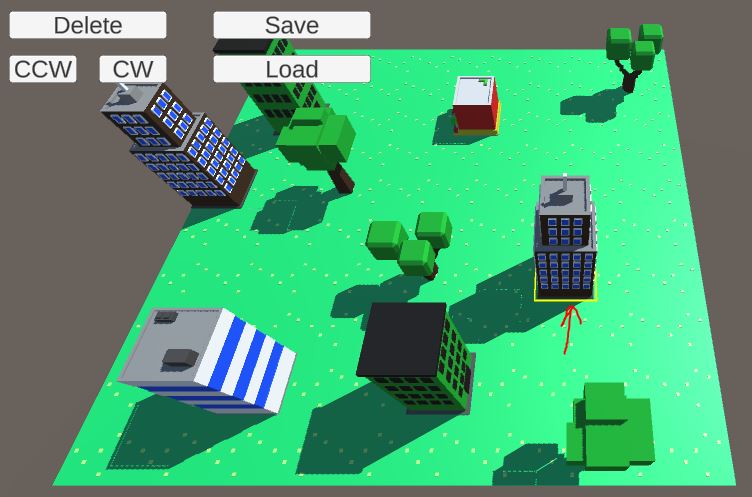
Drag Object Around
- Inherit
IDragHandlerandIBeginDragHandler - Implement
OnDrag(PointerEventData eventData)- Use
Utility.ScreenToWorldPos()to convert the touch position into a world position - Use
Playfield.MoveObject()to move the object
- Use
- Implement
OnBeginDrag(PointerEventData eventData)- Use
Playfield.SelectObject()to select the object
- Use
You are now able to drag objects around in the scene.
Make sure you cannot drag any object to the same spot as another object.
Let’s commit and push before we move on.