Gem.cs
public class Gem : MonoBehaviour
    // TODO Add pointer down and pointer up handlers
    // TODO add drag handlers
Click Reaction
- Begin by inheriting from the pointer down and pointer up handlers
- IPointerDownHandler
- IPointerUpHandler
- Add function
public void OnPointerDown(PointerEventData eventData)- Set the bool parameter called “Touched” on the Animator to true
- Add function
public void OnPointerUp(PointerEventData eventData)- Set the bool parameter called “Touched” on the Animator to false
Play In Editor
When you click a gem (fruit character), you should see it’s face change. 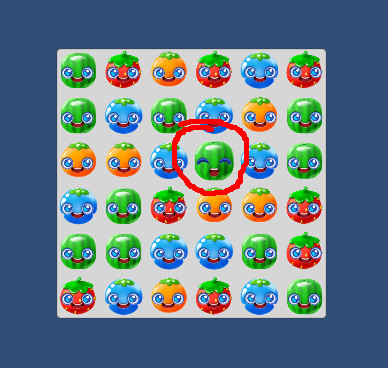
Drag
- Make Gem inherit from
- IBeginDragHandler
- IEndDragHandler
- IDragHandler
- Add function
public void OnBeginDrag(PointerEventData eventData)- reset
m_dragDeltato zero
- reset
- Add function
public void OnEndDrag(PointerEventData eventData)- Set bool “Touched” on the animator to false
- Add function
public void OnDrag(PointerEventData eventData)- Use
eventData.deltato accumulate the total amount of drag inm_dragDelta - If
m_dragDeltaaccumulates more thans_swipeDistin any single direction- Call m_grid.Swap()
- Set bool “Touched” on the animator to false
- Make sure you cannot continue dragging the same gem without releasing the touch and re-touching it
- Use
Hint: I’ve added a m_isDragging bool to the class.
You might want to use that to keep track of when the drag is complete so that you do not double-swipe a gem.
Try it out.
You should be able to swipe gems to make matches.
Make sure you can drag left, right, up, and down.
Make sure matches work. Be sure to check vertical and horizontal matches.
Don’t forget to check for groups larger than 3. A swap could make a group of 4 or even 5.
It’s time to commit and push.