What Are We Doing?
The point of this lab will be to let the player design their own city by placing buildings, roads, and trees.
To put this all together, we have 3 main classes: Prototype, Dragable, and Playfield.
Prototype is something that when you click on it will add a building to the city.
Dragable is a building or object within the city. The user can drag these around to arrange the city.
Playfield is the city itself and the master controller for the project.
Prototype.cs
public class Prototype : MonoBehaviour
    // TODO add IPointerClickHandler
{
    Playfield m_playfield;

    void Start()
    {
        m_playfield = Playfield.Get();
    }

    public GameObject MakeOne()
    {
        GameObject newObj = null;

        {   // TODO Instantiate a copy of this GameObject
            // Remove the Prototype component from the copy (Destroy() the component)
            // Add a Dragable component to the copy
            // Add the copy to the Playfield with Playfield.AddObject()
        }

        return newObj;
    }

    // TODO implement OnPointerClick(PointerEventData eventData)
    // Use Playfield.FindOpenSlot() to see whether there is room to add an object or not
    // If there is room, call MakeOne() to make an object
    // And select the new object with Playfield.SelectObject()
}
There isn’t much going on in Prototype yet.
You’ll be filling in some TODOs later on.
One thing to notice is that Prototype.Start() calls Playfield.Get(), and that in turn relies on Playfield.Start() to have been called first.
I have already arranged the order of these by using the “Script Execution Order” options under “Edit->Project Settings…” 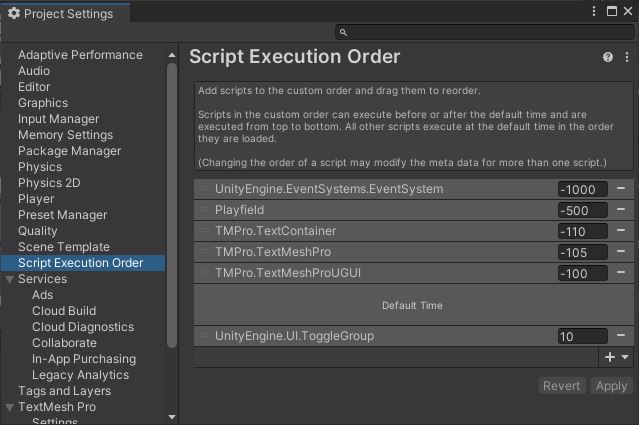
Dragable.cs
public class Dragable : MonoBehaviour
    // TODO Implement the pointer down handler
    // TODO Implement drag handlers
{
    // Programmers add this
    //Vector3 m_dragStart = Vector3.zero;
    Playfield m_playfield;

    void Start()
    {
        // find the playfield - it's somewhere in the scene
        m_playfield = Playfield.Get();

        {   // TODO add this object to the playfield
            // Use Playfield.MoveObject() which will both add the object and put it into position
        }
    }

    // TODO Implement OnPointerDown(PointerEventData eventData)
    // On pointer down (finger down) select this object

    // TODO Implement OnDrag(PointerEventData eventData)
    // Move the object around when dragging

    // TODO Implement OnBeginDrag(PointerEventData eventData)
    // When we begin dragging, mark this object as selected with Playfield.SelectObject()
}
Like Prototype, the Dragable class is all TODOs.
Playfield.cs
The Playfield class is quite large, so let’s look at it in pieces.
Variables
We’ll start with the variables.
public class Playfield : MonoBehaviour
{
    public int m_gridWidth = 10;
    public int m_gridHeight = 10;
    public GameObject m_grassPrefab;
    public GameObject m_selectionBoxPrefab;
    public GameObject m_prototypes;

    static Playfield s_thePlayfield;

    public const float m_gridSpacing = 4.0f;
    GameObject[,] m_grid;
    Dictionary<GameObject, Vector2Int> m_objects;
    GameObject m_selectionBox;
...
The city is laid out as a grid, and the size of that grid is specified at runtime by m_gridWidth and m_gridHeight.
The buildings are stored in the array m_grid with a reverse lookup table in m_objects.
m_grid makes it easy to see what object is in each location, and m_objects tells us what location each object is in.
m_grassPrefab is used to fill the grid with grass at start up.
m_selectionBoxPrefab is a prefab for the selection box that indicates which building the user is working with.
m_prototypes is the root object for the list of available prototype buildings and objects the user can add to their city.
City class
...
    /// <summary>
    /// This is the data structure we will be saving and loading
    /// City holds the entire city as a list of Element
    /// </summary>
    public class City
    {
        /// <summary>
        /// An Element is one object (like a building) in the City
        /// </summary>
        public class Element
        {
            public string m_type;
            public int m_x;
            public int m_z;
            public float m_rot;
        }
        public List<Element> m_elements;
    }
...
This is a class within the class… with another class inside that.
City is Playfield.City and inside that is Playfield.City.Element.
This is the structure we’ll use to save and load our cities.
Start()
...
    void Start()
    {
        s_thePlayfield = this;

        // Create an empty scene filled with grass
        m_grid = new GameObject[m_gridWidth, m_gridHeight];
        m_objects = new Dictionary<GameObject, Vector2Int>();
        GameObject grassRoot = new GameObject("Grass");
        for (int z = 0; z < m_gridHeight; ++z)
        {
            for (int x = 0; x < m_gridWidth; ++x)
            {
                m_grid[x, z] = null;
                GameObject grass = Instantiate(m_grassPrefab);
                grass.transform.SetParent(grassRoot.transform);
                grass.transform.localPosition = new Vector3(x * m_gridSpacing, 0, z * m_gridSpacing);
            }
        }

        // make the selection box (and hide it for now)
        m_selectionBox = Instantiate(m_selectionBoxPrefab);
        m_selectionBox.SetActive(false);
    }
...
Here we initialize the grid and fill it with grass.
API
There’s a fairly complete API in here for adding/deleting objects and moving them around.
...
    /// <summary>
    /// Delete all the placed objects from the scene
    /// </summary>
    public void ClearObjects()
    {
        GameObject selected = GetSelectedObject();
        if (null != selected)
            DeselectObject(selected);
        while (m_objects.Count > 0)
        {
            GameObject obj = m_objects.ElementAt(m_objects.Count - 1).Key;
            DeleteObject(obj);
        }
        m_objects.Clear();
    }

    /// <summary>
    /// Move the specified object to a new location on the playfield.
    /// The position will be quantized to the grid spacing automatically.
    /// The object cannot be moved onto a spot that is already occupied.
    /// </summary>
    /// <param name="obj"></param>
    /// <param name="newPos"></param>
    /// <returns>true if the move is successful or false if the object could not be moved</returns>
    public bool MoveObject(GameObject obj, Vector3 newPos)
    {
        Vector2Int grid = new Vector2Int((int)(newPos.x / m_gridSpacing + 0.5f), (int)(newPos.z / m_gridSpacing + 0.5f));
        return MoveObject(obj, grid);
    }

    /// <summary>
    /// Move the specified object to a new location on the playfield.
    /// The object cannot be moved onto a spot that is already occupied.
    /// If the object is not already on the playfield, it will be added.
    /// </summary>
    /// <param name="obj"></param>
    /// <param name="newPos"></param>
    /// <returns>true if the move is successful or false if the object could not be moved</returns>
    public bool MoveObject(GameObject obj, Vector2Int newPos)
    {
        // must stay on the grid
        if (newPos.x < 0)
            return false;
        if (newPos.x >= m_gridWidth)
            return false;
        if (newPos.y < 0)
            return false;
        if (newPos.y >= m_gridHeight)
            return false;

        // don't try to take a slot that's already occupied
        if (m_grid[newPos.x, newPos.y] != null)
            return false;

        // we're moving
        if (m_objects.ContainsKey(obj))
        {   // remove this object from it's old spot in the grid
            Vector2Int oldPos = m_objects[obj];
            m_grid[oldPos.x, oldPos.y] = null;
        }
        // place this object into it's new spot in the grid
        m_objects[obj] = newPos;
        m_grid[newPos.x, newPos.y] = obj;

        // place the object
        obj.transform.position = new Vector3(newPos.x * m_gridSpacing, 0.0f, newPos.y * m_gridSpacing);
        return true;
    }

    /// <summary>
    /// Returns the currently selected object or null if nothing is selected
    /// </summary>
    /// <returns>the currently selected object or null if nothing is selected</returns>
    public GameObject GetSelectedObject()
    {
        if (null == m_selectionBox)
            return null;
        if (null == m_selectionBox.transform.parent)
            return null;
        return m_selectionBox.transform.parent.gameObject;
    }

    /// <summary>
    /// Select the specified object
    /// </summary>
    /// <param name="obj"></param>
    public void SelectObject(GameObject obj)
    {
        if (null == obj)
            return;
        if (null == m_selectionBox)
            return;
        // activate the selection box
        m_selectionBox.SetActive(true);
        // attach it to the specified object
        m_selectionBox.transform.SetParent(obj.transform);
        m_selectionBox.transform.localPosition = Vector3.zero;
    }

    /// <summary>
    /// If the specified object is currently selected, deselect it.
    /// If the object isn't selected, this does nothing.
    /// </summary>
    /// <param name="obj"></param>
    public void DeselectObject(GameObject obj)
    {
        if (GetSelectedObject() == obj)
        {
            m_selectionBox.transform.SetParent(null);
            m_selectionBox.SetActive(false);
        }
    }

    /// <summary>
    /// Search the grid for an available location and returns it via the "slot" output variable.
    /// </summary>
    /// <param name="slot">The answer of the available slot</param>
    /// <returns>true if a slot is found or false if the grid is entirely full</returns>
    public bool FindOpenSlot(out Vector2Int slot)
    {
        slot = new Vector2Int(0, 0);
        for (int z = 0; z < m_gridHeight; ++z)
        {
            for (int x = 0; x < m_gridWidth; ++x)
            {
                if (null == m_grid[x, z])
                {   // this slot is open
                    slot = new Vector2Int(x, z);
                    return true;
                }
            }
        }
        return false;   // grid was full
    }

    /// <summary>
    /// Checks to see if the "obj" is already on the playfield or not.
    /// </summary>
    /// <param name="obj"></param>
    /// <returns>true if "obj" is on the grid or false if it is not</returns>
    public bool IsOnGrid(GameObject obj)
    {
        return m_objects.ContainsKey(obj);
    }

    /// <summary>
    /// Adds the "obj" to the playfield.
    /// Automatically moves "obj" to the first available location on the grid.
    /// </summary>
    /// <param name="obj"></param>
    /// <returns>true if the object was successfully added or false if not</returns>
    public bool AddObject(GameObject obj)
    {
        Vector2Int slot;

        if (IsOnGrid(obj))
            return false;   // already been added

        if (FindOpenSlot(out slot))
        {
            MoveObject(obj, slot);
            return true;
        }
        return false;
    }

    /// <summary>
    /// Removes "obj" from the grid and Destroy()s the "obj".
    /// </summary>
    /// <param name="obj"></param>
    public void DeleteObject(GameObject obj)
    {
        if (null != obj)
        {
            DeselectObject(obj);
            if (m_objects.ContainsKey(obj))
            {
                Vector2Int slot = m_objects[obj];
                m_grid[slot.x, slot.y] = null;
                m_objects.Remove(obj);
            }
            Destroy(obj);
        }
    }
...
TODOs
Finally, there are some TODOs at the bottom for you to fill out later.
...
    // TODO Add public function void DeleteSelectedObject()
    // If there is a currently selected object, call DeleteObject() to delete it

    // TODO Add public function void RotateSelectedObject(float amount)
    // If there is a currently selected object, rotate that object by the amount specified
    // Negative rotation values rotate the object counter-clockwise

    // TODO add public function void SaveCity()
    // Save the city configuration to "City.xml"

    // TODO add public function void LoadCity()
    // Load the city configuration to "City.xml"
    // And instantiate all the objects in that file
}